Odoo POS closing, with the cash accounted for.
Three apps for the end of a till's day: a log of every voided line and deleted order, cash withdrawals booked to their own account, and reports that show what the drawer was short or over. Shown on one session we drove on Odoo 19.
POS Cancelled Orders
Records every line removed from an unpaid order and every unpaid order deleted, with who, when and where. It logs; it does not block the cashier.
View on the Odoo App Store ↗Cash Out GL Mapping
Name your cash-out reasons on the point of sale and give each its own account, so petty cash and owner draws stop landing on the cash journal's default account.
View on the Odoo App Store ↗POS Reports Suite
Seven reports for closing the day, including the Settlement reconciliation and Cash Register reports used below. Each prints as PDF; the Register, Datewise and Multi-store reports also export to XLSX.
View on the Odoo App Store ↗Prices as the Odoo App Store shows them to a signed-out visitor on 21 November 2026, each a per-database licence. Each app installs on its own; none requires another.
On 21 November 2026 we opened a register on Odoo 19 with a 100.00 float, rang up two cash sales of 9.80 and 2.50, voided a line, deleted an order, took 20.00 out for petty cash and closed with 5.00 missing. Every figure below was then checked in the database.
A line voided, an order deleted.
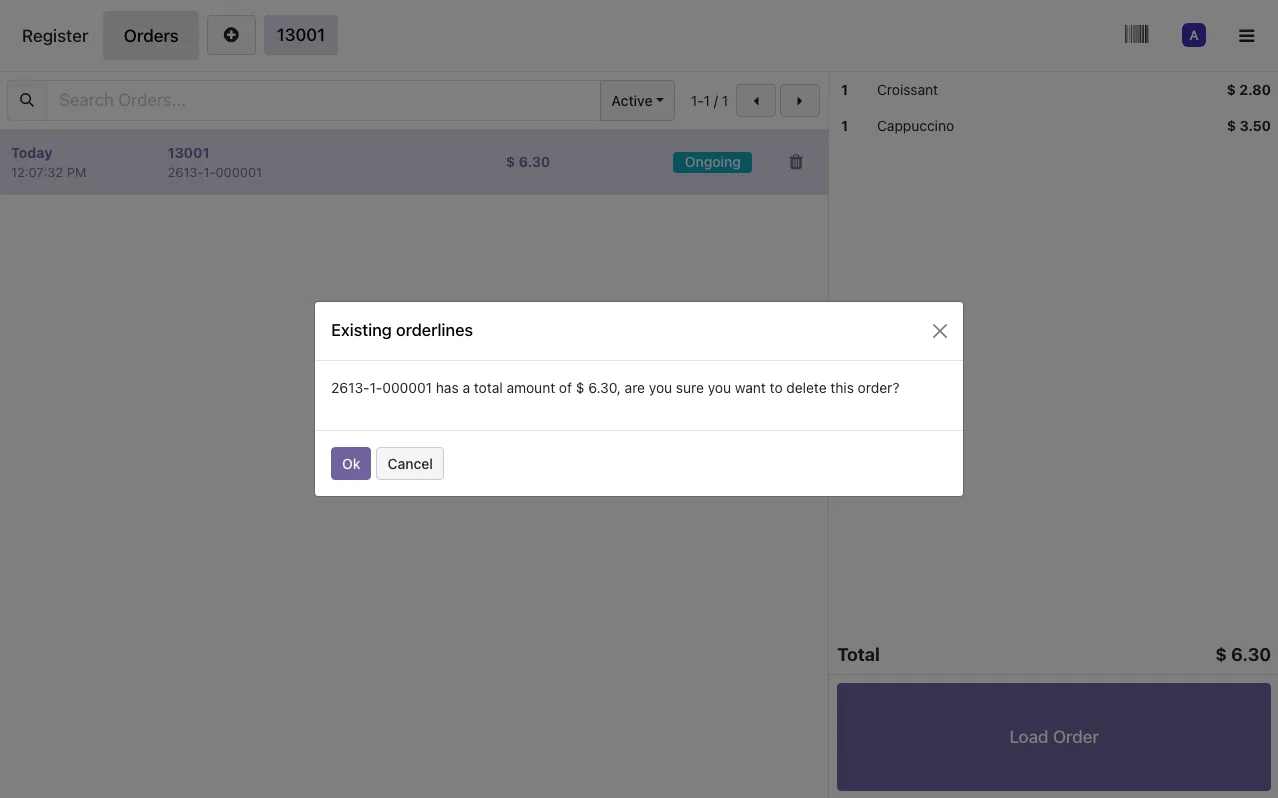
On one order the cashier removed a bottle of water with the numpad’s backspace, pressed twice. Another order, a croissant and a cappuccino for 6.30, was deleted unpaid from the Orders screen.
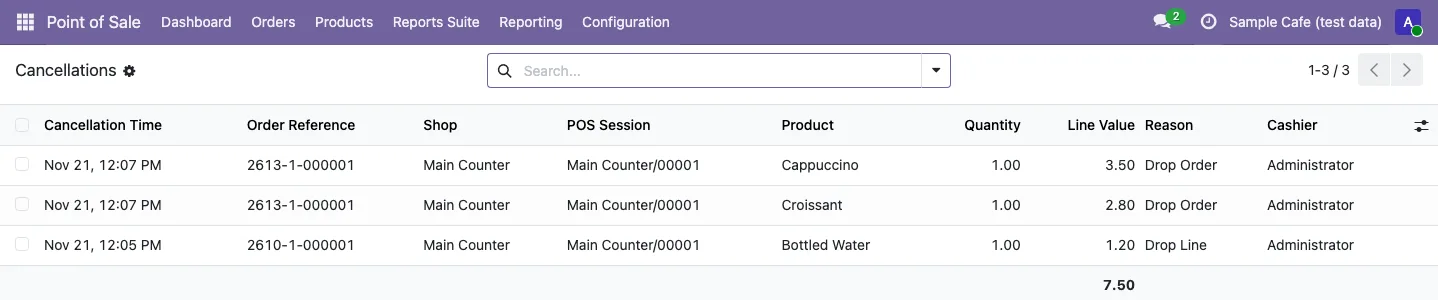
Every void, in one list.
Three rows: the removed line as Drop Line, and each line of the deleted order as Drop Order, with the cashier, the time, the shop, the session and the value, 7.50 in all. Paid orders, refunds and manager voids are not detected; a manager can reclassify an entry by hand.
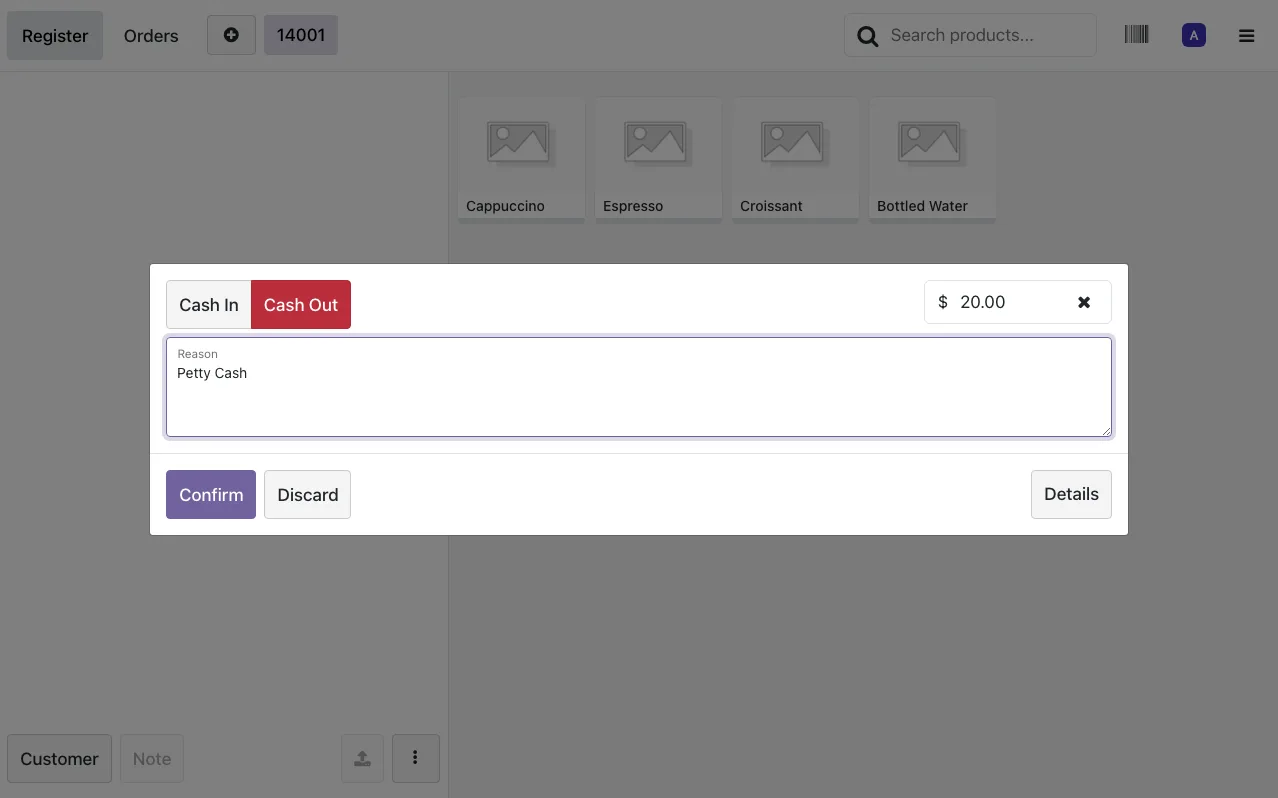
20.00 out, for petty cash.
The cashier used Odoo’s Cash In/Out and typed the reason Petty Cash, which we had set up on the point of sale with its own account.
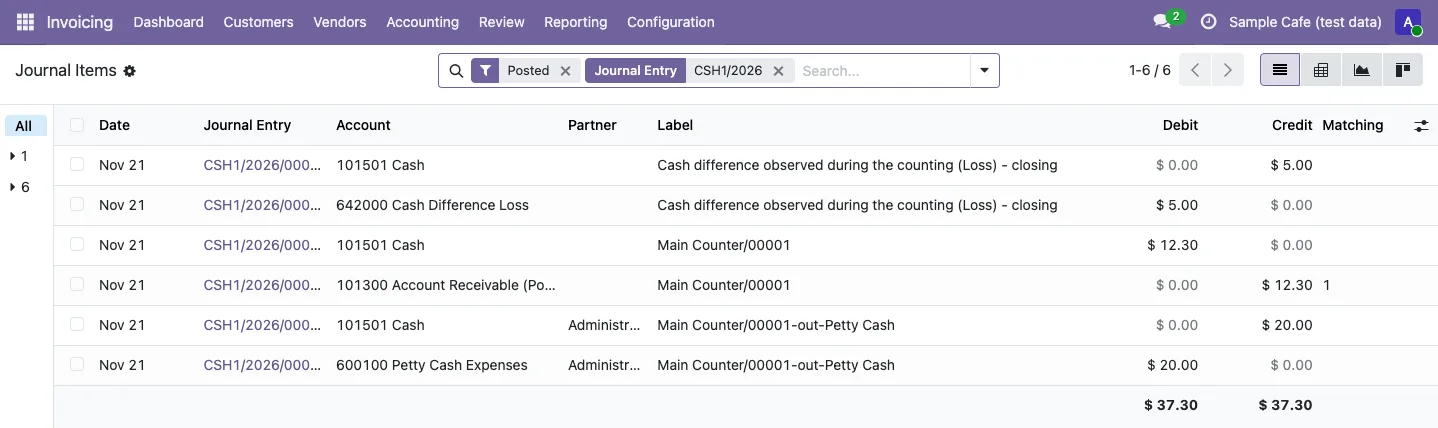
Booked to petty cash, not to the cash journal's default.
The withdrawal posted 20.00 to Petty Cash Expenses, the account set against the reason. The same journal shows the 12.30 of cash sales and, after closing, the 5.00 shortage on Cash Difference Loss.

Counted 87.30, expected 92.30.
Odoo expected 92.30 in the drawer: the 100.00 float, plus 12.30 of cash sales, less the 20.00 taken out. We counted 87.30. Odoo asked before logging the difference, then closed the session and booked the 5.00 to Cash Difference Loss.

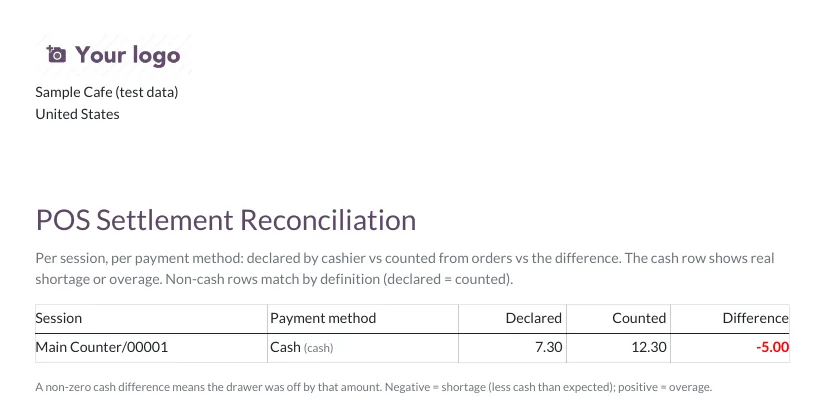
The difference, on paper.
The Settlement report puts the cash row at a difference of -5.00. Its Declared column is the count less the float and the cash in and out (87.30 − 100.00 + 20.00 = 7.30), set against the 12.30 the orders say was taken in cash.
The Cash Register report walks the drawer from the 100.00 opening balance through the petty cash, the cash sales and the 5.00 shortage, to the 87.30 closing balance.

| When | App | What you get |
|---|---|---|
| A cashier removes a line or deletes an unpaid order | POS Cancelled Orders | One row per line in Point of Sale → Reporting → Cancellations: cashier, time, shop, session, product, quantity, value and reason. |
| Cash is taken out of the drawer | Cash Out GL Mapping | A cash-out whose reason matches one you configured posts to that reason's account instead of the cash journal's default account. |
| The counted cash does not match | POS Reports Suite | The Settlement report shows the cash difference per session; the Cash Register report lists every movement from opening to closing balance. |
Booking the counted difference at closing is Odoo’s own behaviour; the apps record and report around it.
Checked
- The session above, on Odoo 19 Community on 21 November 2026, with POS Cancelled Orders 19.0.1.1.8, Cash Out GL Mapping 19.0.1.0.9 and POS Reports Suite 19.0.1.0.11, driven in the browser till.
- In the database afterwards: three cancellation rows, the 20.00 withdrawal posted to the petty cash account, and the session closed with 87.30 counted against 92.30 expected.
Not shown here
- Restaurant mode, refunds and more than one shop.
- The XLSX output, which needs the
xlsxwriterpackage on the server.
Orders and cash or cheque collections booked on the phone with no signal, then invoiced and posted in Odoo.
Read the guide →Barcode label printingA free app for product and price labels on A4 and US Letter sheets, and a $49 designer for your own layouts.
Read the guide →